Discussion topic: Port forwarding not working properly
- Subscribe to RSS Feed
- Mark Topic as New
- Mark Topic as Read
- Float this Topic for Current User
- Bookmark
- Subscribe
- Printer Friendly Page

Message posted on 13 Jan 2024 03:31 PM
- Mark as New
- Bookmark
- Subscribe
- Subscribe to RSS Feed
- Highlight
- Report post
Port forwarding not working properly
Hello everyone,
nice to meet you, I am new to the community and this is my first post.
Forgive me for posting on an already open thread, but I couldn't find suitable answers to my issue.
Basically, the IP associated with the device is not the same as the one that appears in the list for me to create port forwarding.
Going through the various connected devices and seeing their details I verify and the IP present is the one really associated with the device, by means of a static lease set up beforehand.
Whereas after creating port forwarding, I get a totally different IP in the list that I cannot find on the modem.
This problem does not occur on just one device but on all those with a static lease.
You can only set this function via the sky wifi app and not directly from the modem, where there are pull-down menus and the settings are not 100% customizable.
I tried to contact customer care explaining the issue but to no avail.
I hope I have explained myself as simply as possible.
I leave some screenshots below.

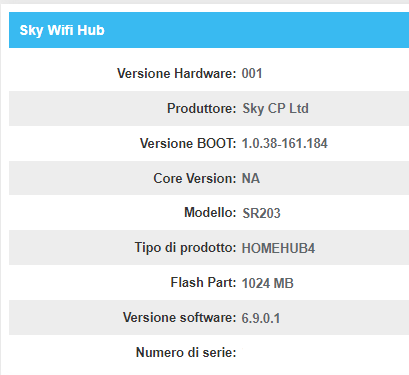
Thanks to everyone who can help me out.
- Subscribe to RSS Feed
- Mark Topic as New
- Mark Topic as Read
- Float this Topic for Current User
- Bookmark
- Subscribe
- Printer Friendly Page
All Replies


Message posted on 13 Jan 2024 06:15 PM
- Mark as New
- Bookmark
- Subscribe
- Subscribe to RSS Feed
- Highlight
- Report post
Re: Port forwarding not working properly
@Anonymous from the one picture that has not been rejected - pictures with details thst can identify you like IP addresses or mac addresses must be obscured - is in Italian this forum supports Sky UK and Sky Ireland. If you are in either country can repost with the pictures adjusted but sorry forum members have no knowledge of Sky Italia's kit.
65inch Sky Glass, 3 Sky Streaming Pucks, Sky Ultrafast + and Sky SR213(white Wifi Max hub) main Wifi from 3 TP-Link Deco M4 units in access point mode
Message posted on 13 Jan 2024 06:27 PM
- Mark as New
- Bookmark
- Subscribe
- Subscribe to RSS Feed
- Highlight
- Report post
Re: Port forwarding not working properly
@Chriseethank you very much for the feedback, although your answer breaks my heart. 😭
To your knowledge, is there an official sky forum for italy?
Message posted on 13 Jan 2024 07:11 PM
- Mark as New
- Bookmark
- Subscribe
- Subscribe to RSS Feed
- Highlight
- Report post
Re: Port forwarding not working properly
@Anonymous try this site https://www.digital-forum.it/forumdisplay.php?4-SKY-ITALIA
65inch Sky Glass, 3 Sky Streaming Pucks, Sky Ultrafast + and Sky SR213(white Wifi Max hub) main Wifi from 3 TP-Link Deco M4 units in access point mode
Message posted on 13 Jan 2024 07:17 PM
- Mark as New
- Bookmark
- Subscribe
- Subscribe to RSS Feed
- Highlight
- Report post
Re: Port forwarding not working properly
@Chrisee Thanks a lot. 👍


Message posted on 30 Dec 2025 07:49 AM
- Mark as New
- Bookmark
- Subscribe
- Subscribe to RSS Feed
- Highlight
- Report post
Re: Port forwarding not working properly
Thanks for sharing your experience with your Sky Broadband issue — it can be really frustrating when your connection drops or speeds aren’t what you expect, especially if you rely on it for work or streaming. Sometimes simple checks like restarting the router, testing speeds at different times of day, or seeing if other devices behave the same can help narrow down whether it’s a line issue or something with the home setup. If those don’t help, Sky support can sometimes spot things you might have missed, like signal strength or account settings that need adjusting. When your connection problems started, did they come on suddenly after an update or change, or has it been gradual over time?

Message posted on 30 Dec 2025 09:12 AM - last edited: 30 Dec 2025 09:22 AM
- Mark as New
- Bookmark
- Subscribe
- Subscribe to RSS Feed
- Highlight
- Report post
Re: Port forwarding not working properly
Your reply was to a year-old post from a user who no longer has a forum account and appears to be entirely unrelated.
BT Halo 3+ Ultrafast FTTP (500Mbs), BT Smart Hub 2
- Subscribe to RSS Feed
- Mark Topic as New
- Mark Topic as Read
- Float this Topic for Current User
- Bookmark
- Subscribe
- Printer Friendly Page