Discussion topic: Wi-Fi
- Subscribe to RSS Feed
- Mark Topic as New
- Mark Topic as Read
- Float this Topic for Current User
- Bookmark
- Subscribe
- Printer Friendly Page


Message posted on 14 Jul 2024 12:56 PM
- Mark as New
- Bookmark
- Subscribe
- Subscribe to RSS Feed
- Highlight
- Report post
Wi-Fi
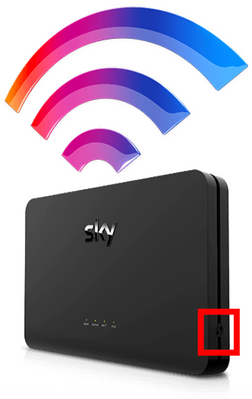
my Wi-Fi broadband router got switched off yesterday and now the TV will not reset. I have turned it off followed all the instructions on my TV but it still won't work. It says to go onto the broadband to a button which is not on my broadband I have pressed the reset button on the broadband router and that still has not worked. I have repeated this process on more than one occasion probably about 20 and it is still not working. Please can you help
- Subscribe to RSS Feed
- Mark Topic as New
- Mark Topic as Read
- Float this Topic for Current User
- Bookmark
- Subscribe
- Printer Friendly Page
All Replies


Message posted on 14 Jul 2024 01:26 PM
- Mark as New
- Bookmark
- Subscribe
- Subscribe to RSS Feed
- Highlight
- Report post
Re: Wi-Fi
@Jan87 wrote:
my Wi-Fi broadband router got switched off yesterday and now the TV will not reset. I have turned it off followed all the instructions on my TV but it still won't work. It says to go onto the broadband to a button which is not on my broadband I have pressed the reset button on the broadband router and that still has not worked. I have repeated this process on more than one occasion probably about 20 and it is still not working. Please can you help
Hi @Jan87
All routers will have a WPS button. If you are on Sky Broadband see below.
- Subscribe to RSS Feed
- Mark Topic as New
- Mark Topic as Read
- Float this Topic for Current User
- Bookmark
- Subscribe
- Printer Friendly Page